Contest Corner: The best giveaways on the net!
As Seen on KOIN 6 News - Click Here
As Seen on KOIN 6 News
Contests: How to Enter & Win Giveaways | Current Giveaways | Winners
Contest Listings | Sweepstakes Saturday | Submit a Giveaway

Popular Features: Holiday Gift Guide 2012 | Product Reviews | Recipes | Celebrity Interviews
Photography | Fitness & Weight Loss | PDX/Seaside/Local | My Life

Navigate: Categories | Archives | Search | Links
Site Info: About | Contact | Grab a Button
HOME

Subscribe

Facebook

Pinterest

Email

Twitter


Recent Highlights

Top Ten With GIMM+ICKY

Top Ten With GIMM+ICKY

May 24th, 2013

Welcome to Top Ten With..., a fun Q&A session where you'll get to learn all about the music [...]

Our Weight Loss Journey: Month 1 After Nutrisystem

Our Weight Loss Journey: Month 1 After Nutrisystem

May 23rd, 2013

As members of the Nutrisystem Nation Blogger Panel, Jai and I received the Nutrisystem program free [...]

Beecology Buzz Balm Review

Beecology Buzz Balm Review

May 22nd, 2013

My lips are ridiculously dry, so I have to keep some sort of balm on them 24/7. I recently got[...]

Soft Scrub Mold & Mildew Stain Remover Gel Review

Soft Scrub Mold & Mildew Stain Remover Gel Review

May 21st, 2013

Living in a damp coastal area, mildew is something that you have to deal with. We just painted[...]

Father’s Day Gift Guide Coming May 28th!

Father's Day Gift Guide Coming May 28th!

May 20th, 2013

Contest Corner is pleased to announce our first-ever Father's Day Gift Guide, starting May 28th [...]

Scroll down to view all our recent posts!


Linksys EA2700 Router Giveaway – Ends 05/22

May 9th, 2012

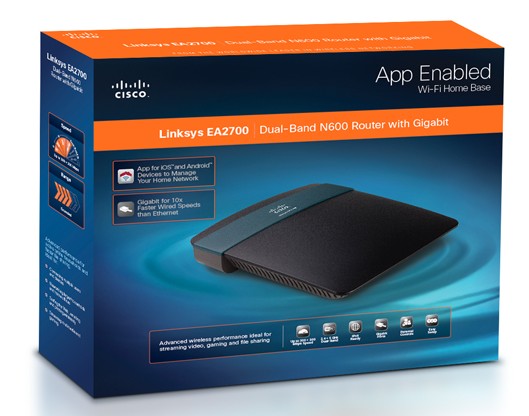
Linksys EA2700

Welcome to a special edition of Nerdy or Novice?, our technology column! In today’s installment, we will not only be sharing our thoughts on the new Linksys EA2700 wireless router, but one lucky reader will have a chance to win this router for themselves as well, so read on!

Nerdy or Novice? Tech Talk With Beeb & Jai

In addition to sharing news on the latest tech toys, Nerdy or Novice? also provides a well-rounded perspective thanks to my co-columnist (and fiancé!), Jai! A seriously tech-savvy guy, Jai owns a computer repair business, and will dissect the technical prowess of these gadgets and games. Meanwhile, I will be providing the layman’s perspective on the user-friendly qualities of this geek gear. Today’s review and special giveaway is for the new Linksys EA2700 Maximum Performance Dual-Band N600 Router with Gigabit. Here’s a little background information on this router provided by Cisco:

The Linksys EA2700 wireless router is perfect for Mom, Dad, your favorite grad, or anyone interested in building the ultimate connected home in 2012. From iPads, to gaming systems, to Wi-Fi enabled TVs, laptops and e-readers, consumers are snapping up consumer electronics that open up a world of entertainment, learning and socializing anywhere in their homes. So if an iPad, Xbox, Internet TV, laptop, etc, is on the list this year, make your wireless home worry-free by including the powerful Linksys EA2700 for home wireless the easy way to set up wireless products around the home, along with your must-have consumer electronics.

Benefits of the new EA2700 include unrivaled speed and is ideal for:

• Creating a powerful wireless network, plus, share files and games at wired speeds 10x faster than Ethernet.

• Networking larger households and home offices

• Surfing the Web, emailing and printing wirelessly

• Connecting multiple users and devices at high speed

• Transferring and downloading larger files

• Streaming multimedia and gaming

Jai set up this router, and this was his opinion on it:

“I’m used to setting up routers the old fashioned way – and by “Old fashioned”, I mean a year or two ago! – by powering them on, plugging them into the network, and using a web browser on a local computer to set things up to my liking. The Linksys EA2700 is capable of doing this, but would much rather use the setup CD to get things running. I was a little reluctant but I went ahead and used their setup method. It was surprisingly easy. The setup program was able to find the new router wirelessly and asked what I’d like to use as the wireless’ SSID (The name you see when searching for your wireless network) and password. I was able to get online with my iPod Touch in just a few minutes.

Just for fun (Yeah, this is the sort of thing I do for fun!) I went ahead and reset the router so that I could have a chance at setting things up manually. I turned off my laptop’s wireless antenna, plugged the Ethernet cable straight into the newly reset router, and typed 192.168.1.1 into my browser. A page came up asking me to insert the CD or download the configuration software. After a few seconds of concern I saw the fine print on the router’s page that let me go into the manual configuration. Everything went great from there since I was in familiar territory. The Dual-Band feature was especially impressive to me. With this you won’t have to worry about your older Wifi devices not being compatible, and your newer devices won’t be slowed down by older technology.”

As for me, I love the wireless range that this unit can provide throughout the house and the lightweight design of the unit. Linksys make quality routers, and this one seems to work great. It might be cool if this had a wallmount option, but that’s the only thing that I could even think of to suggest. This router is awesome in my book!

With Mother’s Day and Father’s Day right around the corner and graduations soon to follow, I would agree that if you’re shopping for a gift and want to get something really cool, a router is a great thing to consider. I know it’s not something that everyone would think to give, but every time I’ve given a “Techie” gift it has always been hugely memorable and useful to the recipient. Since routers are such an important part of our day-to-day computer setups, it’s a practical and helpful option than I think many would love to be surprised with!

The Linksys EA2700 Maximum Performance Dual-Band N600 Router with Gigabit retails for $109.99 and is available on Cisco.com. You can also connect with Linksys on Facebook, Twitter, YouTube, and the Cisco Consumer Blogs.


Giveaway Time!

Linksys EA2700 Maximum Performance Dual-Band N600 Router with Gigabit


One lucky Contest Corner reader will win a Linksys EA2700 Maximum Performance Dual-Band N600 Router with Gigabit! Note: Winner cannot have won the Linksys router in any other contest/giveaway in the last 6 months. Here’s how to enter:

1. For your first entry, click here to visit Cisco.com, then come back here and leave a comment mentioning another product that you would like to own. This step is required to qualify for the drawing.

Want extra entries? Do any of the following, and leave a separate comment for each one:

2. Write a post on your blog linking to this giveaway. Then come back here and leave a comment with the link to your post!
3. Write about this on Twitter, then come back and leave a comment on this post with the link to your tweet! One Twitter entry per person. You can use the button at the bottom of this post to tweet with one click!
4. Subscribe to my blog updates by clicking here. Then come back and leave a comment on this post with the email you subscribed with!
5. Post my button on your website – just copy and paste the following code, and let me know where you put it:

Rules, regulations, and other important stuff: Giveaway ends on May 22nd at 11:59 PM, PST. Winner will be chosen the following day via Random.org. Winner has 48 hours to respond to my notification email, or a new winner will be chosen in their place. Giveaway is open to US residents, 18+.

Nerdy or Novice: Back to School With Linksys

August 31st, 2011

Nerdy or Novice? Tech Talk With Beeb & Jai

Welcome to Nerdy or Novice?, our brand new technology column! Here, you will not only read about the latest tech toys, you’ll also get a well-rounded perspective thanks to my co-columnist (and fiancé!), Jai! A seriously tech-savvy guy, Jai owns a computer repair business, and will dissect the technical prowess of these gadgets and games. Meanwhile, I will be providing the layman’s perspective on the user-friendly qualities of this geek gear.

As summer winds down, parents are preparing for fall by stocking up on school supplies. And these days, back-to-school shopping isn’t just for glue and erasers – it can also entail electronics. The Internet is a crucial part of modern education, so today we have a great tech pick for today’s students: The Linksys E4200 Router!

Linksys E4200

Routers have become an essential item, as they allow anyone in a household to connect to the Internet, whether they’re using a desktop computer, laptop, or a wireless device such as an iPad. So if routers all do the same job, what difference does it make which one you buy? The answer is ease of installation and strength of signal. After testing out the Linksys E4200 Router, Jai and I were both impressed not only with its performance in these categories, but the additional features it offers that would make this router especially useful to students.

Jai set this router up, and it couldn’t have been easier. He explains: “This is very simple to connect to the network. Just plug it in to your modem, and when you go to ‘Connect’ it will bring up a prompt reading ‘This is the first time the device is connecting’. It will ask you to enter the number that’s stamped on the bottom of the router; you put in that number and it gives you a brief, simple screen that asks you to put what you want your network name to be, and suggests a password for you. You hit OK, connect, and it’s all done!”

We’re replacing our old router with the Linksys E4200 because its performance is superior. It has gigabit ports built in which are much faster in moving data over the ethernet cables – it’s full bar more powerful than our old 10/100 router. It’s also got better range than our old router. Previously, there were several corners of the house which could not pick up wireless; now, you can maintain an internet connection wherever you are. (Now I can tweet while doing laundry!)

A unique feature on this router is the fact that it also has a USB port built in. Using this, you could plug a portable drive directly into the network for all your computers to share and access seamlessly. Jai says this would be good for a home theater system; I think it would be great for sharing homework between computers and accessing files easily across the network.

The Linksys E4200 Router is available on Cisco.com for $179.99.

Thanks to Linksys for providing a complimentary router for the purpose of this review.

Linksys: Advanced enough to satisfy tech geeks, simple enough for an average user to set up with no hassle!


Back to school savings from Linksys

Back to school savings from Linksys

Right now, Linksys is offering back to school savings on a variety of wireless bundles. Check out these deals at www.linksys.com/backtoschool!

Holiday Gift Guide 2010: 7 Port USB 2.0 Powered Hub Review

November 18th, 2010

Holiday Gift Guide 2010

Nerdy or Novice: Christmas Edition!

Stocking Stuffers

Welcome to a special holiday edition of Nerdy or Novice?, our technology column! Here, you will not only read about the latest tech toys, you’ll also get a well-rounded perspective thanks to my co-columnist (and fiancé!), Jai! A seriously tech-savvy guy, Jai owns a computer repair business, and will dissect the technical prowess of these gadgets and games. Meanwhile, I will be providing the layman’s perspective on the user-friendly qualities of this geek gear.

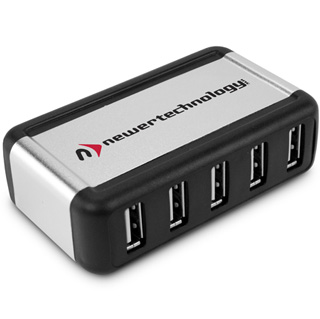
Today’s gift pick is a 7 Port USB 2.0 Powered Hub with 3.5 Amp Power Supply by Newer Technology!

7 Port USB 2.0 Powered Hub with 3.5 Amp Power Supply

7 Port USB 2.0 Powered Hub with 3.5 Amp Power Supply – $27.95

Jai has been testing this unit out, and here’s what he has to say:

“This USB Hub was as good as I could have hoped. The hub basically splits one USB port into 7 – and this can be tricky sometimes with today’s high-powered devices, especially with external hard drives that are powered through the USB port. I didn’t run into any trouble with this unit from Newer Technology.

I have a fancy mouse which has the entire numeric keypad on the thumb position – 17 buttons total! – so I tried using the mouse with the USB Hub for my first test.

The computer recognized the USB Hub within 10 seconds without any intervention from me, and my mouse worked right away when I plugged it in; I didn’t have to reconfigure any of the buttons.

Then, for the heavier power test, I simultaneously plugged in two laptop drives in external USB enclosures – they fired up and ran just fine. These external drives were also powered by the USB hub.

Additionally, I transferred 17 gigs worth of information through the hub, and although I didn’t do any time tests, the transfer rates seemed equal to when I have it plugged in directly to the PC’s USB ports.

Just for good measure I attached a motorized webcam and USB game controller and tried them out. Everything worked together seamlessly on the first try.

One final test I did was to see if the Hub was dependant upon the power adapter or if it could be used for low powered devices running straight from the USB port. This would be handy if you wanted to use it with your laptop and you don’t have an outlet handy. I wouldn’t recommend anyone trying this at home, but here’s what I did…

With my webcam, game controller and mouse plugged into the Hub and working, I yanked the Hub’s power cord out of the wall. Sure enough, they all kept working without interruption.”

Our final verdict:

Jai says: “A simple device that works exactly as advertised.”

Beeb says: “This would be a great stocking stuffer for any techie on your holiday list!”

Our rating: 5 out of 5 Santa hats! Santa hatSanta hatSanta hatSanta hatSanta hat

Jai & Beeb

7 Port USB 2.0 Powered Hub with 3.5 Amp Power Supply is available for $27.95 on Newer Technology’s website.

Holiday Gift Guide 2010: Honestech Software

November 11th, 2010

Holiday Gift Guide 2010

Nerdy or Novice: Christmas Edition!

Welcome to a special holiday edition of Nerdy or Novice?, our technology column! Here, you will not only read about the latest tech toys, you’ll also get a well-rounded perspective thanks to my co-columnist (and fiancé!), Jai! A seriously tech-savvy guy, Jai owns a computer repair business, and will dissect the technical prowess of these gadgets and games. Meanwhile, I will be providing the layman’s perspective on the user-friendly qualities of this geek gear.

Today’s gift pick is Honestech software. We included Honestech as a gift pick in last year’s guide, and these are such fun gift ideas that we thought it was worth repeating! Honestech has a wide variety of programs for each member of the family on your shopping list:

Gifts For Kids

Claymation Studio

Claymation Studio 3.0 Deluxe – $79.99

Honestech’s Claymation Studio is a wonderful, creative gift geared towards children that the whole family can enjoy. You hook up a digital camera to the software, and it takes single-frame snapshots which are animated and turned into a stop-motion film. If you have a child that is interested in art, this would be the ideal present. This provides endless hours of fun, and is an excellent learning tool in addition to being a creative outlet – things like this really help to nurture invaluable skills. And the adults in the family will have a blast with this, too!

We received a copy of Claymation Studio 2.0 last year, and I used the program to record an entry into Gear Live’s HP Envy 13 contest – click here to see the video. I used a doll and some props to create this short little movie. It was really fun to make, and simple to figure out – it’s like a very pared-down version of Adobe Premiere. It didn’t recognize my iPhone camera or Flip Mino as viable cameras, so I used my Logitech webcam. I moved my doll slightly for each new frame, creating the illusion of movement. If you’re thinking of giving this as a gift, I think it would be a good idea to buy some supplies to include, such as figurine clay and wire; this way your children can make their own characters and manipulate them easier. The name “Claymation Studio” is somewhat of a misnomer, since no actual clay is provided!

The options are somewhat limited when it comes to editing the sound. You can record your own voiceover and overdub a soundtrack, but I couldn’t figure out a way to synch the soundtrack right where I wanted it – the music just automatically starts at the beginning. However, it doesn’t feel fair to criticize them too much for the program’s limitations, since I realize that they are trying to keep it as simple and easy to understand as possible since it’s geared towards children. Also, they are now on version 3.0, so I can’t speak to the features of the latest version.

Jai also had fun making his own stop motion videos:

The video ended abruptly when the snail took a nap on Bach’s shoulder during filming. Jai took this photo to prove that no snails were harmed in the making of this video. ;)

No snails were harmed in the making of this video!

We had a blast using this, and I only wish something like this had existed when I was little – I would have loved it! It makes stop-motion films easy to create for people with no prior experience and makes a great learning tool for children.

Our final verdict:

Jai says: “Simple enough for kids, but with tools that a pro could use.  I didn’t expect that it would have features like chroma key (green screening to replace backgrounds), and rotoscoping (make your own Ah-ha “Take on me”  video. ”
Beeb says: “Children and adults alike will have hours of fun, creative play with this program!”

Our rating: 5 out of 5 Santa hats! Santa hatSanta hatSanta hatSanta hatSanta hat

FOTOBOX Plus

FOTOBOX Plus – $79.95

Our next gift idea is one the whole family might enjoy – FOTOBOX Plus, a photo slideshow creator.

Last year, I created a slideshow that was played at a memorial service. Finding the right program for the job was somewhat of a nightmare, and I had to ditch one slideshow altogether and start all over again on another program after realizing that the first program which I had tried did not have advanced enough controls to produce what I wanted. So when I sat down to review Fotobox, I was really curious to see if this was the program that could have saved me all that time when I was assembling that slideshow.

Fotobox is unique in the fact that there is no software: You simply slot your camera’s SD card into the Fotobox device, plug into your USB, and the program launches automatically. You can choose either Beginner’s mode or Advanced mode, depending on the level of control you desire. For a novice, this is definitely as easy as it gets – it’s fairly self-explanatory, and although at times I had difficulty reading files, for the most part it was totally simple and efficient.

This ease of use comes with some limitation on the controls: You can’t set the photos to display for less than 5 seconds, or the transition time for less than 1 second. I think this would not be an issue for most users, but it would be nice to allow full control of the timing. When I was creating the slideshow for the memorial, the hardest part was syncing up the audio with the video in a coherent manner – the songs and photos were telling a story together, so it was important for certain photos to queue up at specific points in each song. I like how you can apply a time duration change to multiple pictures, but it would be nice if there was a way to select all photos automatically instead of clicking on each one.

This wouldn’t be appropriate for all types of slideshows – the slideshow that I made for the memorial service was complex, so it would not be possible to re-create that in Fotobox. But I think for most people this will be a quick and easy way to make a fun presentation, and the user-friendliness and plug-and-play features will surely appeal to the majority of users.

Our final verdict:

Jai says: “If your situation is as follows:  ‘I would like to take the pictures from my camera and turn them into a slideshow. Where do I start?’  Then this is by far the easiest place to do it. All in all I found Fotobox’s approach to be as easy as it gets. The only snag I hit was when I wanted to edit the Introduction frame of the slideshow, It took me a lot longer than it should have. I ended up finding it as a small asterisk-like button after looking for about 2-3 minutes in the “menu”. I’m including an illustrated screenshot of the Fotobox program so that nobody else has to search around for where to go – click here to view it.”
Beeb says: “An easy way for the casual user to create fun slideshows!”

Our rating: 4 out of 5 Santa hats! Santa hatSanta hatSanta hatSanta hat

Gifts For Adults

Easy Video Editor 3.0

Honestech Easy Video Editor 3.0 – $39.99

Finally, we have a program that might appeal to the person on your list with an interest in video editing: Honestech Easy Video Editor 3.0!

I’ve done a moderate amount of video editing in the past, and I’ve used a number of different programs to do so, ranging from the extremely complex to the extremely simple. A few years ago, I used Adobe Premiere to create Anime music videos for Kumori Conyes, I am really that much of a geek! More recently, I’ve used the built-in software in my Flip Mino to do very simple edits, such as clipping off a few seconds of the video. Honestech Easy Video Editor 3.0 falls somewhere between the two extremes: More functionality than the basic program in my Flip, but not overly complex. This aspires to be a happy medium for people who want a few more options when editing their video files without having to use complicated software.

When I first opened the program, I tried to load one of my MP4 files, which is what my Flip Mino saves my recording as. Unfortunately, Honestech Easy Video Editor 3.0 does not support MP4s. I tried to open one of my MP4s that had been converted to AVI, which their program does support, but I got an error message even though there was nothing wrong with the file. Finally, I opened a MPG file which I made with another Honestetch program, Claymation Studio, which the program recognized and was able to open.

The first option I tried was the video file splitter. This splitter is easy to use- just pause to where you want to split your file, and hit the green button. This creates a separate file with all the data after the cut point. I think it would be nice if this splice tool had more options – since you can only cut off the end of a clip, you have to go back and forth several times if you want to isolate one particular section.
I like how the storyboard is layed out somewhat like Adobe, but in a very simple fashion. It was simple to trim portions of the video clip and arrange them on the storyboard. Once you’ve arranged the files to your liking, you have the option of adding effects. I probably wouldn’t make use of any of these personally, but others may enjoy playing around with them.

Once you’re finished, you can then save the file, burn to a disc, upload to YouTube or convert to iPod format. I saved it as an MPG and it worked just fine.

Here is Jai’s thoughts on this software:

“I recently tried out Honestech’s Easy Video Editor 3.0 software. A relative had asked me to help recover and clean up some footage taken on a VHS camcorder from the early 90′s and I thought this would be a great real-world test run. After using another Honestech product, VHS to DVD 4.0, to actually extract the video from the video tape, I was ready to begin. It took me a little time to wrap my head around the editor, but it wasn’t as difficult as I was anticipating. Video editors are notorious for having a long learning curve and this product really tries to help you through the process. I ended up with a very nice result. I was VERY impressed with the ability to burn to Blu-ray, and export to ipod/iphone formats. I was also happy with the variety of video formats that it would accept. Some of the more obscure formats like DVD raw (.vob) files wouldn’t take but there are very few situations where this would be needed. Every .avi, .wmv. and .mpg I could find loaded like a champ. Even the .avi’s dragged ‘n’ dropped straight from my Canon camera.

Everything worked in both Windows 7 and Windows XP. The only snag I ran into was updating the software under Windows 7 using the update patch from their website. I kept getting “The installed version of the application could not be determined. The setup will now terminate.” This was of little consequence since everything worked fine without the update.”

Our final verdict:

Jai says: “If you already have a working solution to edit your videos, I wouldn’t try and switch over unless you’re interested in the Blu-ray features.  If you’re looking to jump into video editing for the first time, this package does the job and it’s very inexpensive.”
Beeb says: “Bottom line: If you have a lot of video editing needs, you’re probably better off using something like Adobe Premiere. But if you’re a casual user that just wants to spruce up your home movies, this might be the program for you.”

Our rating: 3 1/2 Santa Hats out of 5! Santa hatSanta hatSanta hatHalf Santa hat

Jai & Beeb

All the Honestech products seen in this article are available to purchase on Honestech.com.

Holiday Gift Guide 2010: Powermat Review

November 2nd, 2010

Holiday Gift Guide 2010

Gifts Just For Him

Nerdy or Novice: Christmas Edition!

Welcome to a special holiday edition of Nerdy or Novice?, our technology column! Here, you will not only read about the latest tech toys, you’ll also get a well-rounded perspective thanks to my co-columnist (and fiancé!), Jai! A seriously tech-savvy guy, Jai owns a computer repair business, and will dissect the technical prowess of these gadgets and games. Meanwhile, I will be providing the layman’s perspective on the user-friendly qualities of this geek gear.

Electronics are always a top seller during the holidays. Are you looking for a great gadget to give that special tech-savvy person on your shopping list? Then a Powermat might be what you’re looking for!

Portable Mat with Powercube

Portable Mat with Powercube – $79.99

Powermat is a unique wireless charging mat that you can use to charge almost any device. The Powermat plugs into your computer and provides you with a space to charge up to three different devices at once. You choose which receivers you need, plug them into your electronics, and place the magnetized cube directly on the Powermat to lock it into place and instantly recharge. The Powermat can charge iPods and iPhones, an array of smartphones, and Nintendo DS – you can click here to access a full list of supported products and customize your own bundle based on what devices you own.

Powermat sent us a Portable Mat with Powercube and two boxes full of different receivers, so we can charge virtually everything with this! The Powermat also has a USB slot on the side, so if you have an unusual USB device that doesn’t have a Powermat receiver, you can plug it directly into the side of the mat. We’ve been using this to charge my iPhone and Jai’s iPod Touch, Google Android phone, and different bluetooth devices – having the Powermat has created one convenient place to charge our different devices without tying up several different outlets or USB ports. While it is wireless for the most part, the Powermat does still need to be plugged into an electrical outlet; but it makes it very easy to swap out the devices. (They also have another model with a built-in battery!)

The Portable Mat is ideal for travel – it folds up easily and fits into a custom carrying case which they provide with the unit. We’ve taken this on the road with us a few times now, and it was very handy for charging our devices on the go. For those with iPods or iPhones, this gives you the freedom of recharging your device without having to bring your computer with you. I ended up telling a few people at WordCamp about it, since we took it with us for the conference weekend!

Jai & Beeb

Our final verdict:

Jai says: “It’s a great portable charger for someone with more than one device that they carry around with them. If you have two or three devices with different chargers, this replaces them all.”

Beeb says: “This would be a useful gift for the techy guy – or girl! – on your holiday list!”

Our rating: 4 out of 5 Santa hats! Santa hatSanta hatSanta hatSanta hat

Powermat products can be purchased online at Powermat.com. Click here to use their “Configure Your Solution” tool to find the right Powermat for your needs and budget.

Nerdy or Novice: Audio Recorder 2.0 Deluxe Review

July 2nd, 2010

Welcome to Nerdy or Novice?, our brand new technology column! Here, you will not only read about the latest tech toys, you’ll also get a well-rounded perspective thanks to my co-columnist (and fiancé!), Jai! A seriously tech-savvy guy, Jai owns a computer repair business, and will dissect the technical prowess of these gadgets and games. Meanwhile, I will be providing the layman’s perspective on the user-friendly qualities of this geek gear.

Audio Recorder 2.0 Deluxe

Today, we’re reviewing Honestech’s Audio Recorder 2.0 Deluxe.

Jai
Jai’s Take:

I’m not new to capturing analog audio from various sources and saving it to a digital format. My Grandparents purchased a reel-to-reel tape recorder in the early 60’s and it’s still being used today. Transferring audio requires both hardware (to physically connect the device to the computer), and software (some way for the computer to interpret and manipulate this data). Honestech’s Audio Recorder 2.0 Deluxe package has both.

Honestech’s Audio Recorder 2.0 Deluxe works exactly as advertised. The “MUZ BOX”, as it’s labeled in front, is indeed USB powered so you don’t need to use an AC adapter and the USB plug accepts a standard male B-type cable (the type that plugs into most any printer) so you don’t have to carefully keep track of  “that one special cable.” Also included are audio cables that will work with almost all devices you will run across. Any device that sends audio to a 3.5mm jack (standard headphones) or RCA plugs will work. The exception to this is that some very old devices, like the reel-to-reel mentioned above, use a 1/4″ jack. In the unlikely event that you’d need one, they are under $5 and can be found just about anywhere that deals in electronics.

The hardware and software work perfectly together. The correct input device was automatically selected in the software and you are stepped through the entire process, from recording from the device, to burning the audio to a CD. You can also save the audio to mp3. Normally, I use separate programs for each of the steps: Recording, re-encoding, and burning.
Up until this point, the Audio Recorder 2.0 met my highest expectations. It does everything I had hoped for and is the easiest system that I have come across for a beginner to just jump in and start using. Let me go into a few reasons that my expectations were EXCEEDED.

Although the hardware and software play nicely with each other, they are not tied together. I was able to choose alternate audio sources in the software. Sometimes, if you have the cables handy, using the “line-in” jack on the computer is easier than plugging in an external device. What’s even better is that every audio recording package that I tried had no trouble accepting the input from the “MUZ BOX”. The part that really impressed me is that it worked perfectly without drivers under Windows XP, Windows 7, and even Ubuntu Linux 10.04!  I plugged the audio capture device into my Linux box and “Audacity” immediately recognized the “MUZ BOX” audio input. Nice.

Beeb Beeb’s Take:

As a journalist, I frequently use audio recorders for conducting interviews. When I first started – back in the ancient days of the late 90s! – I used a cassette recorder, but now it’s all moved over to digital. These days, I utilize my iPhone’s SpeakEasy app instead of tape; it works great, but the one issue that I have is that there is no way to pull the audio off onto your hard drive or email it to yourself. It’s vital that I have a backup of these important files, which is where Audio Recorder 2.0 Deluxe comes in.

I tested this program out last month after I interviewed Corey Feldman during the Goonies 25th Anniversary Celebration. I needed to save a copy of the recording on my computer so that I could transcribe it, so I installed the Audio Recorder 2.0 software and hooked up the “MUZBOX”. Now, one downside to iPhones is that while they take a standard 3.5mm jack, the base of the plug is much narrower than are commonly available. But Jai is handy with a Dremel, so he actually filed the jack cover down so that it would hook up to my iPhone. I plugged it in, opened the software, and jumped straight to the “Advanced” option, as I am comfortable navigating around audio software. I queued up the interview, hit record, and had a .wav file within minutes. Couldn’t be simpler!

Now, I haven’t tried recording music with this yet because – for shame! – my record player is broken. However, this worked like a charm for backing up my important interview recordings, and I am very pleased to have a reliable system in place that I can use in the future. I will absolutely be using this program again!

Nerdy or Novice: VHS to DVD 4.0 Deluxe Package Review

February 17th, 2010


Welcome to Nerdy or Novice?, our brand new technology column! Here, you will not only read about the latest tech toys, you’ll also get a well-rounded perspective thanks to my co-columnist (and fiancé!), Jai! A seriously tech-savvy guy, Jai owns a computer repair business, and will dissect the technical prowess of these gadgets and games. Meanwhile, I will be providing the layman’s perspective on the user-friendly qualities of this geek gear.


In today’s column, we’ll be reviewing Honestech’s VHS to DVD 4.0 Deluxe Package.

Jai’s Take:

“I recently had an opportunity to try out Honestech’s VHStoDVD 4.0 deluxe package. This was great timing as my Grandmother recently asked me to transfer one of her old VHS home tapes onto a DVD. I’ve done this many times in the past using several different methods and it’s always been a complicated endeavor. Here’s my take on this system…

When run in beginner mode, this is the easiest method that I’ve ever dealt with to capture raw video and burn it to DVD. I followed the directions, installed the software using the included CD, and the hardware worked perfectly on the first try. The USB capture device is as simple as I can imagine one being. It connects to your computer with a standard Mini-B USB cable (the small type that most cameras and phones use) so you won’t have to worry about keeping track of “that one special cable”. It also receives its power via USB so there are no batteries or power adapters to fuss with. There are four other input ports on the unit: s-video, composite video, RCA left audio, and RCA right audio.
It would have been convenient for them to have added a coaxial cable input, since that’s what I use with my VCR, but my VCR also has composite outputs (as pretty much all do). Here is where I ran into my first minor snag. My VCR only has a single RCA audio output but the VHStoDVD unit has 2 inputs, so I had to make a quick run to Radio Shack to pick up an RCA splitter. Without this, all the audio would have been directed to either the left or right. With my mono to stereo RCA splitter in hand I got back to work…

First, I tried beginner mode and this is where this unit really shined. It steps you through everything that needs to be done: Pop a blank DVD in the burner, select your inputs, select the recording time, and hit record. When you come back in a few hours, you have a finished DVD waiting for you. This DVD has no menus or chapters, just a faithful recreation of what you had on tape. Also keep in mind that some of these tapes, especially home-made ones, will hold several hours of video. You’re going to have to cue the tape up before continuing on DVD #2, so make sure you keep tabs on your tape counter. One my second run-through I simply waited for a good cutoff point as the two-hour mark came up and pressed the stop button on both the capture, and the VCR. During the recording process I was a little nervous when I saw that the audio and video were slowly drifting out of sync during the preview. I was relieved to see that the final product had no such problem.

Then I tried advanced mode. This worked great for extracting the raw video onto the hard drive. I also had some success in creating titles, menus, and chapters but it really was a tough slog getting familiar with a new layout. I couldn’t quite get things to work exactly the way I was intending. The fact that I already know how to do this on other programs limited my patience in learning something new. I couldn’t find a timescale to tell me how long each clip was in order to make editing decisions and I never did figure out what the preview strip on the right side of the screen was trying to tell me. The process of trial and error is made harder by the fact that you need to wait a while to see how the final product comes out. An easy to access preview function would help with this.

One big plus that I should note is that their software does recognize video streams from other capture devices. Earlier I mentioned that a cable coaxial input would be nice. Well, I tried their software on a laptop with a coaxial input and it recognized it without a problem. It also recognized the built-in webcam. Conversely, other video capture software will work with their USB device. The fact that everything works within a standardized and inter-compatible way guarantees that this will be my new video capture device of choice.”

Beeb’s Take:

I have a box in the attic full of VHS tapes of old family movies. I’ve been wanting to convert them onto DVD so that I can have a backup copy, and also so that I can easily share them with other relatives. So when I had a chance to test out VHS to DVD 4.0 Deluxe Package, I thought this would be a great way to do so.

I tested out the “Beginner Basic” option on this software, and it was a piece of cake. The tutorial walks you through every step – all you do is hook up the Vidbox to your DVD player, stick in a DVD, and pop in your tape. The tape plays directly on the screen, so you can queue it up to the exact spot you want to start recording from. It then processes the data and burns your DVD. Doesn’t get much easier than that! Obviously, your options are a little more limited on the basic mode (the DVD autoplays from the beginning as opposed to having a menu, etc.), and I also used the program after Jai had bought the RCA splitter, which made it much easier for me to use.

When I start transferring all my family movies over on to DVD, I’ll delve in deeper and play with some of the advanced options. But like most people, I’m short on time – so being able to simply pop in a disc, stick in my VHS tape, and get the job done instantly is the kind of simplicity and ease that makes life a whole lot easier.

Holiday Gift Guide 2009: Futura Gamer’s Desk Review

November 19th, 2009


Welcome to a very special holiday edition of Nerdy or Novice?, our brand new technology column! Here, you will not only read about the hot tech toys for Christmas ’09, you’ll also get a well-rounded perspective thanks to my co-columnist (and fiancé!), Jai! A seriously tech-savvy guy, Jai owns a computer repair business, and will dissect the technical prowess of these gadgets and games. Meanwhile, I will be providing the layman’s perspective on the user-friendly qualities of this geek gear.

Today’s gift guide pick is the Futura Gamer’s Desk from LapWorks.


Jai’s Take:

“I’ve been using the Futura Laptop Desk regularly with two very different laptops for about two months now. The first thing I noticed out of the box is that the unit looks nice and feels very durable. So far, that’s proven to be true as it’s held up to my daily abuse without a scratch. Other notable features are that it has lots of open spaces for air to circulate and a generous number of rubber grip pads, 14 on the top and 10 on the bottom, to help prevent slip disasters. The size of the platform and the distribution of vents and rubber grips make the laptop desk a very effective one-size-fits-all solution. Even a 20.5″ Vaio AW series sits comfortably on the unit. In addition, it can be folded in half for portability.

The Laptop Desk can be used in two different ways: It can be folded in half like a clamshell, or be opened completely to better fit on your lap or support a larger laptop. If you’re one of those people that prefers the laptop keyboard tilted towards you, there is a little plastic prop that will allow you to do this while the Laptop Desk is in its folded configuration. I personally didn’t use it in this way. For one, I don’t mind my keyboards lying flat, and two, there was some wobbliness that didn’t feel right. I didn’t feel as if it were going to tip over, but the laptop was free to shake side to side slightly.

I preferred the open and flat configuration. In this way not only can you use any table, carpet, couch, or lap as a desk, but you’re able to use the mouse pad extensions. I tried both the ‘MouzPad’ and the ‘Max MouzPad.’ I found the MouzPad to be a bit small to work with a standard-sized mouse. It only extends the edge of the Laptop Desk by 3 inches and there just isn’t much room to maneuver. It did work well, however, with my portable mini-mouse that I use when traveling. It was also great with a trackball. The larger option, the ‘Max Mouzpad’ gives you plenty of room with a 9 x 11 inch pad to work with. This setup really worked well for me on any flat surface. When on your lap, the ‘Max MouzPad’ extends far out enough that there is some flex that has to be compensated for by shifting your legs a bit, but this is minor. I am very impressed with the durability, flexibility, and portability of the Futura Laptop Desk and its extensions.”

Beeb’s Take:

When I saw the laptop desks that LapWorks offer, I knew immediately that it was something Jai would like – but what I didn’t anticipate is how useful I would find it. I thought the “MouzPads” were a neat idea for gamers or those times when you need to use a mouse with your laptop, but I couldn’t really picture myself using a laptop desk. But when I tried the Futura Gamer’s Desk with my netbook, I was immediately impressed by its ergonomic benefits. Unlike Jai, I actually preferred the half-fold clamshell style configuration, because it worked with the small size of my laptop much better. Here is a photo of Jai’s laptop side-by-side with mine, which illustrates the size difference:

My tiny netbook is only 10.5″ long, and I find myself sometimes straining to read text on the screen. This propped the screen right up to a comfortable eye level, and also made it more comfortable to type. I noticed no shifting or instability and was surprised by how well it gripped on the pads.

I think this would be a great gift for any gearhead or tech enthusiast on your list this year. And after trying the Futura Gamer’s Desk for myself, I might just end up stealing it from Jai when he’s not looking!

The Futura Gamer’s Desk with Regular MouzPad and Max MouzPad is available from Lapworks for $44.95.

Holiday Gift Guide 2009: Futura Gamer’s Desk Review

November 19th, 2009


Welcome to a very special holiday edition of Nerdy or Novice?, our brand new technology column! Here, you will not only read about the hot tech toys for Christmas ’09, you’ll also get a well-rounded perspective thanks to my co-columnist (and fiancé!), Jai! A seriously tech-savvy guy, Jai owns a computer repair business, and will dissect the technical prowess of these gadgets and games. Meanwhile, I will be providing the layman’s perspective on the user-friendly qualities of this geek gear.

Today’s gift guide pick is the Futura Gamer’s Desk from LapWorks.


Jai’s Take:

“I’ve been using the Futura Laptop Desk regularly with two very different laptops for about two months now. The first thing I noticed out of the box is that the unit looks nice and feels very durable. So far, that’s proven to be true as it’s held up to my daily abuse without a scratch. Other notable features are that it has lots of open spaces for air to circulate and a generous number of rubber grip pads, 14 on the top and 10 on the bottom, to help prevent slip disasters. The size of the platform and the distribution of vents and rubber grips make the laptop desk a very effective one-size-fits-all solution. Even a 20.5″ Vaio AW series sits comfortably on the unit. In addition, it can be folded in half for portability.

The Laptop Desk can be used in two different ways: It can be folded in half like a clamshell, or be opened completely to better fit on your lap or support a larger laptop. If you’re one of those people that prefers the laptop keyboard tilted towards you, there is a little plastic prop that will allow you to do this while the Laptop Desk is in its folded configuration. I personally didn’t use it in this way. For one, I don’t mind my keyboards lying flat, and two, there was some wobbliness that didn’t feel right. I didn’t feel as if it were going to tip over, but the laptop was free to shake side to side slightly.

I preferred the open and flat configuration. In this way not only can you use any table, carpet, couch, or lap as a desk, but you’re able to use the mouse pad extensions. I tried both the ‘MouzPad’ and the ‘Max MouzPad.’ I found the MouzPad to be a bit small to work with a standard-sized mouse. It only extends the edge of the Laptop Desk by 3 inches and there just isn’t much room to maneuver. It did work well, however, with my portable mini-mouse that I use when traveling. It was also great with a trackball. The larger option, the ‘Max Mouzpad’ gives you plenty of room with a 9 x 11 inch pad to work with. This setup really worked well for me on any flat surface. When on your lap, the ‘Max MouzPad’ extends far out enough that there is some flex that has to be compensated for by shifting your legs a bit, but this is minor. I am very impressed with the durability, flexibility, and portability of the Futura Laptop Desk and its extensions.”

Beeb’s Take:

When I saw the laptop desks that LapWorks offer, I knew immediately that it was something Jai would like – but what I didn’t anticipate is how useful I would find it. I thought the “MouzPads” were a neat idea for gamers or those times when you need to use a mouse with your laptop, but I couldn’t really picture myself using a laptop desk. But when I tried the Futura Gamer’s Desk with my netbook, I was immediately impressed by its ergonomic benefits. Unlike Jai, I actually preferred the half-fold clamshell style configuration, because it worked with the small size of my laptop much better. Here is a photo of Jai’s laptop side-by-side with mine, which illustrates the size difference:

My tiny netbook is only 10.5″ long, and I find myself sometimes straining to read text on the screen. This propped the screen right up to a comfortable eye level, and also made it more comfortable to type. I noticed no shifting or instability and was surprised by how well it gripped on the pads.

I think this would be a great gift for any gearhead or tech enthusiast on your list this year. And after trying the Futura Gamer’s Desk for myself, I might just end up stealing it from Jai when he’s not looking!

The Futura Gamer’s Desk with Regular MouzPad and Max MouzPad is available from Lapworks for $44.95.

Nerdy or Novice? Tech Talk With Beeb & Jai – Delta Force Xtreme 2 Review

October 14th, 2009


Welcome to Nerdy or Novice?, our brand new technology column! Here, you will not only read about the latest tech toys, you’ll also get a well-rounded perspective thanks to my co-columnist (and fiancé!), Jai! A seriously tech-savvy guy, Jai owns a computer repair business, and will dissect the technical prowess of these gadgets and games. Meanwhile, I will be providing the layman’s perspective on the user-friendly qualities of this geek gear.

In today’s column, we’ll be reviewing the beta version of Delta Force Xtreme 2, a first-person shooter PC video game that takes the player through military combat scenarios.

Jai’s Take:

“While I was installing the Delta Force Xtreme 2 open beta I wasn’t quite sure what to expect. For some reason, I was anticipating a gratuitously violent shoot ‘em up with over-the-top explosions and fantastic weapons straight out of science fiction. Instead the experience was much more akin to a simulation of a military engagement. It really captured the feeling that I was part of a team of soldiers with a specific assignment in a very realistic setting. The computer-generated friends and foes all appeared very convincing and distinct with their own look. The weapons looked and sounded very authentic as did the vehicles and other machines of war. The first thing that really impressed me was how realistic my own shadow looked. My first two minutes of playing would have looked ridiculous to a spectator as I just kept walking around looking at the ground. I just couldn’t get over how realistically my own shadow moved in the game. I also appreciated the compass and navigation system that the game provides. It made following my team mates, and keeping focused on the mission objectives much easier while moving across the landscape as our orders were streaming in over the radio. There were a couple of times when the A.I. had trouble getting my team mates in and out of buildings. In fact, the only problems I ran into were A.I. related, but this is a beta version after all. I enjoyed replaying the mission, while trying different combinations of rifles and explosives. Being able to specialize changes the strategy and gameplay greatly even when you’re repeating past missions.”

Beeb’s Take:

I had a lot of fun playing Delta Force Xtreme 2! I haven’t had the chance to play many first-person shooters, so I was looking forward to trying this out. My lack of experience in this genre meant there was a learning curve where I got shot down by the enemies a few times before getting the hang of it. But I got used to the gameplay pretty quickly, and soon I was in the thick of combat. There are several missions in the game, so it involves more than just shooting at opponents. You work with your teammates to take down foes, blow up their headquarters and obtain intelligence. You have a wide array of weapons at your disposal, from machine guns to knives and grenades – I liked having options and seeing what weapons worked the best for different targets. Although this is a combat game, I did not find the violence to be gratuitous. However, it is rated “T” for Teen, so do keep age-appropriateness in mind if you’re considering this for your kids.


Delta Force Xtreme 2 can be purchased from NovaWorld’s Online Store for $29.99.