


I’m fortunate to live in a safe area with low crime. Burglaries and break-ins are not common – it’s the kind of small community where you could leave your door unlocked and likely have no problems. But the safety of my home and loved ones is still very important to me, and like most people, I’m eager to take any precautions I can to increase my security. So when LifeShield Security offered to send me a complimentary home security kit and 24/7 home monitoring so that I could test their service out, I was happy to take them up on the offer and see how a home security system might benefit me.
LifeShield Security offer a unique “plug and protect†wireless home security system which homeowners can install themselves. You may already be familiar with LifeShield, because they were featured earlier this month on ABC’s Extreme Makeover: Home Edition. Their “Do-it-yourself” Home Kit includes a keypad console, a handset that doubles as a cordless phone, two base chargers, a grid extender, 8 door & window sensors, a siren detector, and a keychain remote.
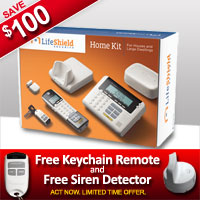
When my Home Kit arrived, I was eager to see how it would work. It looked like a fairly intricate system with a lot of parts, and since I thought it might be complicated to assemble, I put the box aside until Jai and I had a good block of time to work on it.
The system was actually not as complex or hard to set up as I had initially thought. Everything assembles in a straightforward manner, and there is a helpful DVD that walks you through the whole process. Keep in mind, you’re not going to have this finished in 20 minutes; Jai and I spent several hours assembling the system, because we really wanted to take our time setting it up, read through all of the guides, and customize it to our needs. It was a fun project for a rainy Sunday afternoon!
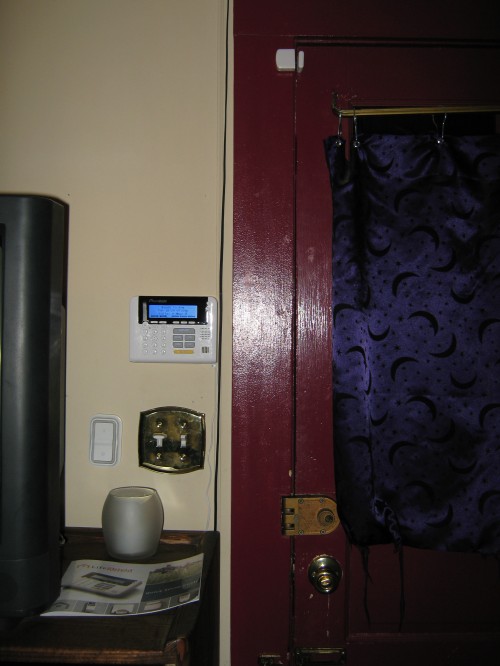
LifeShield console and sensor on my front door
The first step in setting up the Home Kit is charging the phone and connecting the base to the Internet and phone line. Next, we set up the console by the front door, which is the keypad that we’ll use to arm the security system before leaving the home, going to bed, and so forth. Next, we connected the grid extender, which allows for maximum wireless coverage all through the house.
After this, we installed sensors over the front door, back door, fire alarm, and three windows. You attach the sensor to the frame with a bracket with double sided tape, then place a corresponding magnet on the window or door itself. They provide you with several spacers in the package, so you can customize the height of the magnet and sensor as needed for each entry – the only place we had to improvise a bit was on the back door. My house was built in 1929 and is undergoing full renovations, so the back door currently has a huge, wacky door frame that we put up to fix the door temporarily until it gets replaced. Because of the odd dimensions, we nailed a small block of wood onto the door to make the magnet fit properly.
Only three of the windows in the house open, so we still have three sensors left. We could use these inside the home on cabinets – you can set up your system to chime or send you a notification when someone opens a cabinet containing medicine, liquor, etc.
Once all the sensors were installed and programmed, we were able to activate the system. The LifeShield Home Kit offers an array of features, which I found to be quite impressive:
- Security & Alarms: You can arm your LifeShield system at night, to alert you if anyone enters through a monitored door or window; you can also arm the system before leaving the house for work or a vacation. When the system is triggered, an alarm sounds all through the house and notifies LifeShield’s home monitoring center, who will then attempt to contact you and notify the authorities. If the alarm gets set off by accident, you have 30 seconds to enter in your code and cancel it – this can be done from the console or your cordless phone. There is also a panic button on the console which you can press and hold for 2 seconds for an immediate emergency dispatch – it will give you the option for police, ambulance, or fire; if a selection is not made in 5 seconds, it will automatically contact the police. There is also a panic button on the phone, which you can access by sliding down a panel that is provided to prevent you from accidentally pressing it. (The panic option can not be canceled once pressed.) You can also activate panic mode by holding down two buttons on your remote keychain at the same time.
- Remote access: You can control your security system from anywhere in the world by logging in to the LifeShield website. You can set up alerts, and even view a detailed event history of each time a door or window was opened in your home.
- Cordless phone: The system comes with a fully functional phone which includes features like voicemail, “Do not disturb” settings, and more.
- Keypad console: This main console allows you to arm your system and even view the weather forecast and severe weather alerts, the time, missed calls, and shows when doors and windows are opened in the home. You can also use the console in conjunction with the cordless phone as an intercom or baby monitor.
- Siren detector: This sensor sits next to your smoke alarm, and when it detects that the fire alarm is going off and meets certain audio requirements, it will set off the house alarm and notify the monitoring center.
Our system will be in “Practice mode” for the next seven days, so we can avoid any false alarms while we get used to how it operates. I’m very excited to have this system set up and I think it will be a great asset to my home – not just for the security that it adds, but the extra peace of mind also. Now when I hear those bumps in the night (Usually deer or raccoons that like to hang out in my yard!), I can rest easier knowing that my security system will alert me if any intruders try to enter. I also think this is a fabulous way to deter would-be criminals in the first place – the kit comes with a “Protected by LifeShield” sign, which I hung on my front door, as well as stickers which I placed on the back door and bedroom window. If some ne’er-do-well does attempt to break in, they certainly won’t want to stick around when they hear the alarm going off. I also like the inclusion of the panic button, which I think could be valuable for medical emergencies as well as intruders; it’s comforting to think that I could summon an ambulance at the push of a button if needed. I will be posting updates over the coming months to keep you posted on how the LifeShield system is working out for us, so stay tuned!
Special Discount:
LifeShield would also like to offer a special discount for Contest Corner readers. You can receive $50.00 off the HomeKit and one month of free monitoring by visiting www.lifeshield.com/momdeal and entering promo code “momdeal50†at checkout.

Looks like a great package – love that there is a phone that is useable with this, too!
Great review. I love the fact that you have some left over sensors. I’d place one on the cabinet containing medicine even though it’s a high cabinet.
This is really interesting. I would love to have this myself just for the piece of mind.
looks like a great package – and so much simpler than the one we have.
Great review. I don’t have a security system because we live in apartment but this looks like it could work!
This sounds like a very good security system. I like the idea of having remote access too!
Our security system is about to expire – I am definitely going to have to look into this!
Looks like a great package and you can install in yourself. When things look very complex, I let it sit for a while and then go back to look it. 🙂 Most of all it is great to know that your safe in your home. Thanks for sharing.
We have been talking about getting a security system since we purchased our home. You can never be too safe, and it gives mom a little more piece of mind:)
You know, I often think about getting a home security system. I think it would definitely help me sleep better at night! This was very helpful, and love the discount- Bookmarking this page:)
WOW-this is interesting-I will have to check them out!
If you get a chance and would like to you can enter my giveaway here:
http://happyhomemakerandmomma.blogspot.com/2010/10/giveaway-time-win-csn-gift-certificate.html
Wow, I could never leave my doors unlocked here in So. Cal! I live in an apartment. I wonder if this would work out for us. I like that you can set up the system from anywhere in the world. That’s reassuring since I’m 100% positive that I would forget to arm the security. Thanks for the review.
I love the idea of this. It makes it so easy and affordable for anyone to have a security system in their home!
Thanks so much for stopping by, everyone!
I was able to order the lifeshield homekit (not the free 30 day trial) with the upfront cost for $299 for only $124 using the below codes. They let you combine codes. Posting this on blogs I came across while researching lifeshield. Just saying thanks and I hope this helps someone.
FSHIP,couponcabin,momdeal50,LSCSS125
I really like what you’re saying here. There’s so much confusion and myths surrounding security.What you’re saying makes total sense Thanks so much for highlighting this issue
As a web site owner I believe the material here is reallyfantastic. I thank you for your time. You should keep it up forever! Good Luck…
You’re so awesome! I do not believe I’ve truly read through something like that before.
So great to discover someone with some original thoughts on this topic.
Really.. thank you for starting this up.
This web site is something that is needed on the web, someone with a bit of originality!
Also visit my blog post … over here
Everyone loves what you guys tend to be up too. This
kind of clever work and reporting! Keep up the great works guys I’ve included you guys to our blogroll.
Look at my web blog; where do bed bugs come
Hello there, I discovered your blog by means of Google whilst searching for a comparable topic, your site got here up, it appears great.
I’ve bookmarked it in my google bookmarks.
Hello there, simply become aware of your weblog via Google, and found that it’s
truly informative. I am going to be careful for brussels.
I’ll appreciate should you continue this in future. A lot of folks might be benefited out of your writing. Cheers!
Check out my web site christmas 2010
Hey there would you mind letting me know which webhost you’re utilizing? I’ve
loaded your blog in 3 different web browsers and I
must say this blog loads a lot faster then most. Can you suggest a good hosting provider at a honest price?
Many thanks, I appreciate it!
Excellent post. Ι’m dealing with sß‹me of these issues
as well..
According to a recap of 2013 Vapetoberfest , Southern Ca could be
the zenith with over 160 vape stores.
If you decide this is the car for you, you have several different options to
bring this home with you. Really you just need a cell phone and a pen and paper in your
car. Your zip code will allow the website to align you with
insurance companies that service drivers in your area.
Of the features available, you will need the following, at the very least:.
Outline your inventory tracking methods, and detail
the processes you intend to follow to track purchases, sales, as well as customer satisfaction. What is the most important thing for raising
capital for a new venture or expansion of your existing business.
We have tutored high school students who have ‘always been weak in math.
Free Games have become the order of the day in killing boredom.
There’s no explanation for this, it just seems that these two subjects get tangled
up in youngsters brains more often then not.
When the Los Angeles Kings won the Stanley Cup championship June 11, Redondo
Beach Cafe co-owner Kosta Tsangaris and a packed house of fans
dreamed of bringing the coveted trophy to the restaurant known to
many as the place to watch hockey in the South Bay. Also
remember to visit your dental specialist and have regular checkups.
While it’s impractical to think that you can remove stress
from your life completely, making a concerted effort to try to
limit the amount of stress can seriously reduce the amount of and severity of Crohn’s flare-ups.
Linked – In gives you the chance to build your portfolio and
to present your expertise. The SEO Expert you end up hiring should be
so skilled in his work that a glance at your website should be enough for the organization to tell you the repair
it needs. What intensifies matters even is that if you are not proficient
about how the internet searchers functions, then depending on the SEO service providers will be helpful
for you.
It is vital to do your homework and make sure that you are joining an established exchange, with a strong reputation offering a
tailor-made service for your business needs. For example
if you own a liquor store and your employees serve liquor to minors, a
license bond could cover some of the loss involved.
You may refer to this hosted communication solution as a hosted IP
PBX.
You really make it appear sso easy along with
your presentation however I to find this topiic tto be actually
one thing which I think I’d never understand.
It sort of feels too complicated and very broad for me.
I’m taking a lok ahead on your subsequent put
up, I will try to gett the hold of it!